I've decided to build a new poker table with a raised rail. Kind of an ambitious project but since I already have a poker table, I can take my time.
I'll document as much as I can of the process, with a ton of info for those curious enough to build something like this or for feedback from those that have.
I decided on a slightly shorter table than a traditional 10 person table, but slightly wider than the compact tables. The final table should comfortably hold 8 players, but could accommodate 9 no problem. Final overall dimensions will be 84" x 44".
Rough plans for the Raised Rail table
The first job was to cut the 4' x 8' sheets of plywood into 84" x 44". That meant cutting off 12" on the length and 4" on the width. Since I don't own a table saw I used 2x4s clamped along the 3 boards stacked. The job went smoothly with some minor chipping along the edges.
Next step was to round the corners, that meant a 22" arc along all the boards. I was debating using a jigsaw or router and decided on the router for a more accurate cut. In order to guide the router along the corners I had to devise a jig. Using pegboard, I made a pretty poor jig since pegboard is a little pliable around the pivot point so the accuracy wasn't perfect. But it did a decent job.
The cutting took two days, the cuts themselves weren't too bad (did 2-3 passes per router cut) it was the constant battle with the accuracy of the jig. Final step was rounding the edges of the rail.
Finally all the cuts are made, next step is order materials.
For portability, I'm going to install foldable legs. Ordering online it would run me $45 plus $40 for delivery, so I looked into the classifieds in my area and luckily found a banquet table for $20 that I could re-use the legs from. Overall I saved $65!
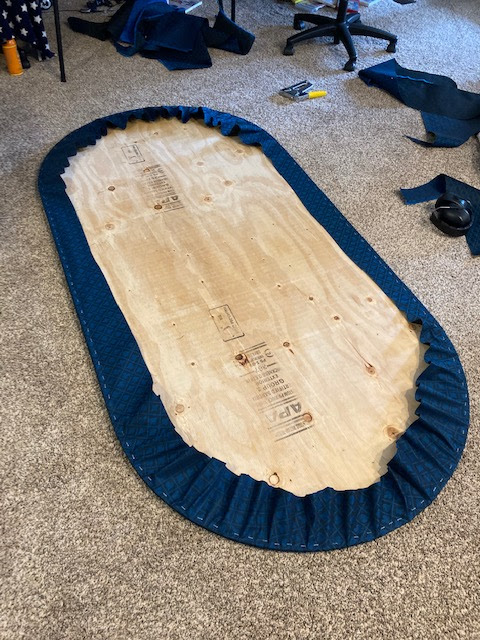
All pieces are ready, now it's time to upholster the table top and rail. I decided to start with the surface, it doesn't really matter, whatever your preference.
First I sprayed half of the surface piece with a spray adhesive, laid the foam on that half and then sprayed the other half. I let the foam set for an hour, then cut away the excess.
Next I laid the speed cloth (good side down) and put the top face down. Starting from the sides, I pulled the cloth, stapled, and made way from end-to-end. I had to pull a few staples at the end to tighten up the middle, hopefully will remain nice and taught for the installation.
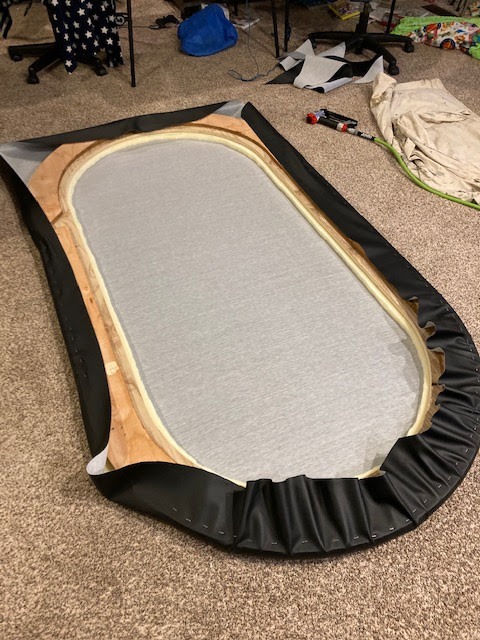
With the playing surface done, now it was on to the rail. The rail is the most complicated part with a raised partition for the led lights, and vinyl upholstery. To start the rail, I used the spray adhesive to add the 1" foam.
Once the foam is applied, I then added the vinyl with a million staples. This is where a pneumatic stapler helps.
It took a couple of hours for the padded rail, but I am happy with the result. Putting the rail up against the surface, you can get a glimpse of the colour scheme I chose.
Next step is preparing the base mount. I stained and put a thin layer of Polyurethane, then set out the hardware orientation to plan.
After arranging the layout, I had to router out the recess for the carrying handles, once completed, could screw in all the hardware. I got the idea of the handles from a fellow table-maker called Irish, he gave me some great tips.
All the pieces are finally constructed, ready for assembly. First step is installing the LEDs, then installing cup holders, and finally assembling it all together.
The LEDs were stuck on the interior of the spacer
Next up was mounting the rail. The underside of the speed cloth was a mess of wrinkles and staples. I used good-ol ducktape to seal under the edge. Not proud of this solution, but it worked and nobody will really see this. Last step on the rail was to mount, alight, and fasten with about 10 screws.
I also thought about how to add drink holders for those folks not close enough to a nearby table. I decided to attach 16 Ga construction fasteners under the rail and slip in drink holders and voila. One issue I noticed right off the bat was that the edges of the cup holder was pretty sharp so I didn't want to risk slicing the rail. Bending aluminum is tricky, it's a very tense metal that doesn't succumb to bending easily. I managed to bend it slightly downwards in a vice, then applied the inner lip to a grinder which dulled it, but leaves heat marks. I actually don't care too much about the heat scarring since I don't really host a high end uppity game, but note that it does leave the holders with a tampered look.

Some of you have asked how I set up the portable drink holders so here are a few additional photos. I basically cut half of a building fastener in half, used a step bit to add a few additional screw holes. In order to have a minimal but sufficient gap for the holder, some slight bending in the vice along with installing it with the cup holder in place will help achieve the right slide gap.
Ok, so now I'm getting close to completion!